Deploy in minutes
Configure one tfvars file, run make apply, and integrate CognitoApi into any application.
Prerequisites
Before You Begin
Before installing the CognitoApi, please ensure that you have the following tools installed
# Install Terraform
# https://developer.hashicorp.com/terraform/install

# Install Docker
# https://docs.docker.com/get-docker/

# Install AWS CLI
# https://docs.aws.amazon.com/cli/latest/userguide/getting-started-install.html

# Install Python 3 + boto3 (used by the passkey-enable bootstrap step)
# https://www.python.org/downloads/ && pip install boto3- Terraform: A recent version is recommended, in order to deploy all the underlying AWS infrastructure.
- Docker: To build all lambdas and their layers in an automatic way.
- AWS CLI: To perform some of the project bootstrapping actions like creating the S3 bucket and DynamoDB table for Terraform states and collaboration.
- Python 3 + boto3: Used by the one-time passkey-enable bootstrap step (a
null_resourcethat turns on WebAuthn for the user pool).
Configuration
Configure Your Environment
First you need to configure at least one deployment environment (e.g., dev) by filling the corresponding configuration file
terraform/environments/dev/terraform.tfvars.dev# Example terraform.tfvars.dev - the values you must set per environment.
# (The file also defines each Lambda's name / description / entrypoint / zip path;
# those ship with sensible defaults you rarely need to touch.)
# --- AWS & Terraform state ---
aws-region = "eu-west-1"
terraform-state-bucket = "my-cognitoapi-tfstate-012345678901"
auth-microservice-terraform-state-file-key = "dev/auth-microservice.tfstate"
# --- Domain, certificate & API Gateway ---
auth-api-dns-name = "auth.dev.example.com"
auth-api-acm-certificate-name = "*.dev.example.com"
route53-zone-name = "dev.example.com"
auth-api-r53-zone-id = "Z1029992156D8O"
certificate-name-tag = "wildcard.dev.example.com"
auth-api-name = "my-auth-api"
auth-api-description = "My Authentication API"
auth-api-version = "v1"
auth-api-stage-name = "dev"
cognito-authorizer-name = "auth-cognito-authorizer"
api-cloudwatch-log-group-name = "auth-api-gw-cw-logs"
apigw-account-settings-cloudwatch-role-name = "auth-api-gw-cw-settings-role"
apigw-account-settings-cloudwatch-policy-name = "auth-api-gw-cw-settings-policy"
# --- Cognito user pool & password policy ---
user-pool-name = "authentication-api-pool"
user-pool-client-name = "apigw-client"
password-minimum-length = "14"
password-require-lowercase = "true"
password-require-numbers = "true"
password-require-symbols = "true"
password-require-uppercase = "true"
mfa-configuration = "ON"
refresh-token-validity = "1" # days (ID/access tokens last 1 hour)
enable-token-revocation = "true"
cognito-sns-role-name = "authentication-api-pool-sns-role"
identity-pool-name = "authentication-api-idp"
# --- Email (Amazon SES) ---
cognito-ses-email-arn = "arn:aws:ses:eu-west-1:012345678901:identity/example.com"
cognito-from-email-address = "no-reply@dev.example.com"
cognito-reply-to-email-address = "no-reply@dev.example.com"
from-email = "no-reply@dev.example.com"
email-support-address = "support@dev.example.com"
email-team-name = "The CognitoApi team"
email-welcome-subject = "Welcome to The CognitoApi"
email-forgot-subject = "Reset your password"
email-mfa-reset-subject = "Reset your authenticator (MFA)"
email-mfa-reset-message = "Your MFA reset code is {code}. Enter it to set up a new authenticator app. If you didn't request this, ignore this email."
new-user-email-message-template-file = "email_templates/user_invitation_email_dev.html"
# --- Runtimes ---
auth-lambdas-runtime = "python3.13"
auth-lambdas-timeout = "30"
auth-lambdas-memory-size = "256"
custom-message-lambda-runtime = "nodejs22.x"
custom-message-lambda-timeout = "10"
custom-message-lambda-memory-size = "256"
# --- Passkeys / WebAuthn ---
# The relying-party ID MUST match the host that serves your frontend.
# Use "localhost" for local dev, or your real domain in production.
webauthn-relying-party-id = "dev.example.com"
passkey-bootstrap-python = "python3"Configuration Parameters:
aws-region
The region where to deploy your authentication API.
terraform-state-bucket
This S3 bucket will hold your terraform states files. We are expecting a name and the IAC will create this bucket and use it.
auth-api-dns-name
This is the dns to use for your API, for example: auth.dev.thecadors.com.
auth-api-acm-certificate-name
This is the domain name for which the certificate should be issued, for example: *.dev.thecadors.com.
route53-zone-name
The route 53 zone id that will be used for the domain name of your API, for example: dev.thecadors.com
certificate-name-tag
The tag name that will be set for the ACM certificate used by your API, for example: wildcard.dev.thecadors.com.
auth-api-name
The authentication API name, for example: thecadors-auth-api.
auth-api-description
The authentication API description, for example: TheCadors Auth API.
auth-api-r53-zone-id
The route53 zone ID to use (corresponding to route53-zone-name), for example: Z1029992156D8O.
auth-api-stage-name
The API Gateway stage name to use, for example: dev.
user-pool-name / user-pool-client-name
Names for the Cognito user pool and its app client.
password-minimum-length & password-require-*
Password policy. Defaults to 14 chars requiring lowercase, uppercase, numbers and symbols.
mfa-configuration
MFA enforcement. Set to ON to make TOTP MFA mandatory for every user.
refresh-token-validity & enable-token-revocation
Refresh-token lifetime in days (e.g. 1 = 24 h; ID/access tokens last 1 hour) and whether tokens can be revoked.
identity-pool-name
Name of the Cognito Identity Pool used to exchange JWTs for scoped AWS credentials.
cognito-ses-email-arn
ARN of the verified SES identity used to send emails, e.g. arn:aws:ses:eu-west-1:012345678901:identity/example.com.
cognito-from-email-address / reply-to / from-email
Sender and reply-to addresses for account emails (must belong to the verified SES identity).
email-welcome-subject / email-forgot-subject
Subjects for the welcome (temporary password) and forgot-password emails.
email-mfa-reset-subject / email-mfa-reset-message
Subject and body of the MFA-reset recovery email. Use {code} as the placeholder for the recovery code.
auth-lambdas-runtime / custom-message-lambda-runtime
Runtimes for the Python endpoint handlers (e.g. python3.13) and the Node.js custom-message trigger (e.g. nodejs22.x).
webauthn-relying-party-id
Passkey relying-party ID. Must match the host serving your frontend - localhost for local dev, your domain in production.
The file also contains a name, description, entrypoint and zip-source path for each Lambda function - these are pre-filled and rarely need changing. Seeterraform/environments/dev/terraform.tfvars.dev in the repo for the full, ready-to-edit file.
Installation
Deploy the Infrastructure
Process of installing and deploying CognitoAPI
export AWS_PROFILE=MyAwsDevProfile
git clone https://github.com/TocConsulting/cognito-api.git
cd terraform
# Create your env config from the template (the real file is gitignored)
cp environments/dev/terraform.tfvars.dev.example environments/dev/terraform.tfvars.dev
# ...then edit terraform.tfvars.dev with your own values
ENVIRONMENT=dev make test
ENVIRONMENT=dev make plan
ENVIRONMENT=dev make apply
The commands above will:
- Set up your AWS profile by exporting it inside the terminal, please change the name of the profile MyAwsDevProfile to yours and set it also inside the file terraform/live/services/auth-microservice/provider.tf.
- Create your environment config from the committed template (
terraform.tfvars.dev.example→terraform.tfvars.dev) and fill in your own values. The real tfvars file is gitignored, so your account IDs and domains never get committed. - Test the terraform infrastructure files.
- Perform a terraform plan to check if everything is okay and gives you an idea about all resources that will be deployed.
- Perform a terraform apply to deploy all the needed infrastructure inside your AWS account.
Need More Help?
Please refer to the Makefile help for more detailed commands and options.
API Usage
Authentication Requirements
The endpoints take no API key. Calls only send the inputs each endpoint documents, plus an Authorization: Bearer token where a signed-in user is required. Before exposing the API publicly, protect the unauthenticated endpoints at the edge (AWS WAF rate-limiting + API Gateway throttling) to guard against abuse and "financial DDoS" - an API key would not have stopped that anyway, since it is visible in every browser request.
Postman Collection Setup
You can find a Postman collection at postman/CognitoApi.postman_collection.json
You need to set the following variables inside Postman:
API_BASE_URL
The DNS name to use to call your auth API.
The email of the user you want to create.
PASSWORD
The password to use when you create a test user.
VerificationType
Must be set to SOFTWARE_TOKEN_MFA.
Note: The TOTP inside Postman is generated for you automatically using the MFA_SECRET environment variable, which is set from the API call output, once the user has been confirmed.
Let's see how this API works:
A walkthrough of the core sign-up and sign-in flow. The API has 23 endpoints in total - password recovery, self-service MFA reset, passkeys and admin actions are all in the full API Reference.
Create a new user
Use a POST method on the endpoint: v1/users
{
    "full_name": "Tarek CHEIKH",
    "email": "tarek@tocconsulting.fr",
    "mobile_phone_number": "+3301234567"
}
You will get an answer that looks like this:
{
    "email": "tarek@tocconsulting.fr",
    "user_id": "129514d4-b081-7004-e470-b6adacd32db4",
    "status": "CREATED"
}
After this call the new user will receive an email containing a temporary password, that they need to use with the endpoint: v1/users/{{user_id}}/confirm to confirm the creation.
Confirm a new user
Use a POST method on the endpoint: v1/users/{{user_id}}/confirm
{
    "email": "tarek@tocconsulting.fr",
    "temporary_password": "WpbyHbcIc#pNo3",
    "new_password": "WpbyHbcIc#pNp9"
}
You will get an answer that looks like this:
{
    "email": "tarek@tocconsulting.fr",
    "user_id": "129514d4-b081-7004-e470-b6adacd32db4",
    "qr_code_secret": "UB42J65BKO473DIOOXGWOQZYT7AZKAS7W3AAHVTVT5IPRV",
    "otpauth_uri": "otpauth://totp/CognitoApi%3Atarek%40tocconsulting.fr?secret=UB42J65BKO473DIOOXGWOQZYT7AZKAS7W3AAHVTVT5IPRV&issuer=CognitoApi",
    "mfa_session": "AYABeLHXhcXCnAA3E29UUMbVqKgAHQABAAdTZXJ2aWNl...",
    "status": "PENDING_MFA"
}
Confirm the MFA
Use a POST method on the endpoint: v1/users/{{user_id}}/confirm-mfa
{
    "email": "{{EMAIL}}",
    "otp": "123456",
    "mfa_session": "{{MFA_SESSION}}"
}
You will get an answer that looks like this:
{
    "email": "tarek@tocconsulting.fr",
    "user_id": "129514d4-b081-7004-e470-b6adacd32db4",
    "mfa_status": "CONFIRMED"
}
For a forgotten password
Use a POST method on the endpoint: v1/forgot-password
{
    "email": "tarek@tocconsulting.fr"
}
You will get an answer that looks like this:
{
    "email": "tarek@tocconsulting.fr",
    "user_id": "129514d4-b081-7004-e470-b6adacd32db4",
    "status": "PASSWORD_FORGOT_CONFIRMATION_SENT"
}
To set a forgotten password
Use a POST method on the endpoint: /v1/users/{{user_id}}/confirm-password
{
    "email": "tarek@tocconsulting.fr",
    "new_password": "#Y3KdGR9QKg_a9",
    "verification_code": "304482"
}
You will get an answer that looks like this:
{
    "email": "tarek@tocconsulting.fr",
    "user_id": "129514d4-b081-7004-e470-b6adacd32db4",
    "status": "NEW_PASSWORD_SET_SUCCESSFULLY"
}
Email Notifications
The authentication API sends automatic emails to users during the account management process. Below are examples of the emails users will receive when creating an account and resetting a password.
New User Welcome Email
Sent after creating a new user account
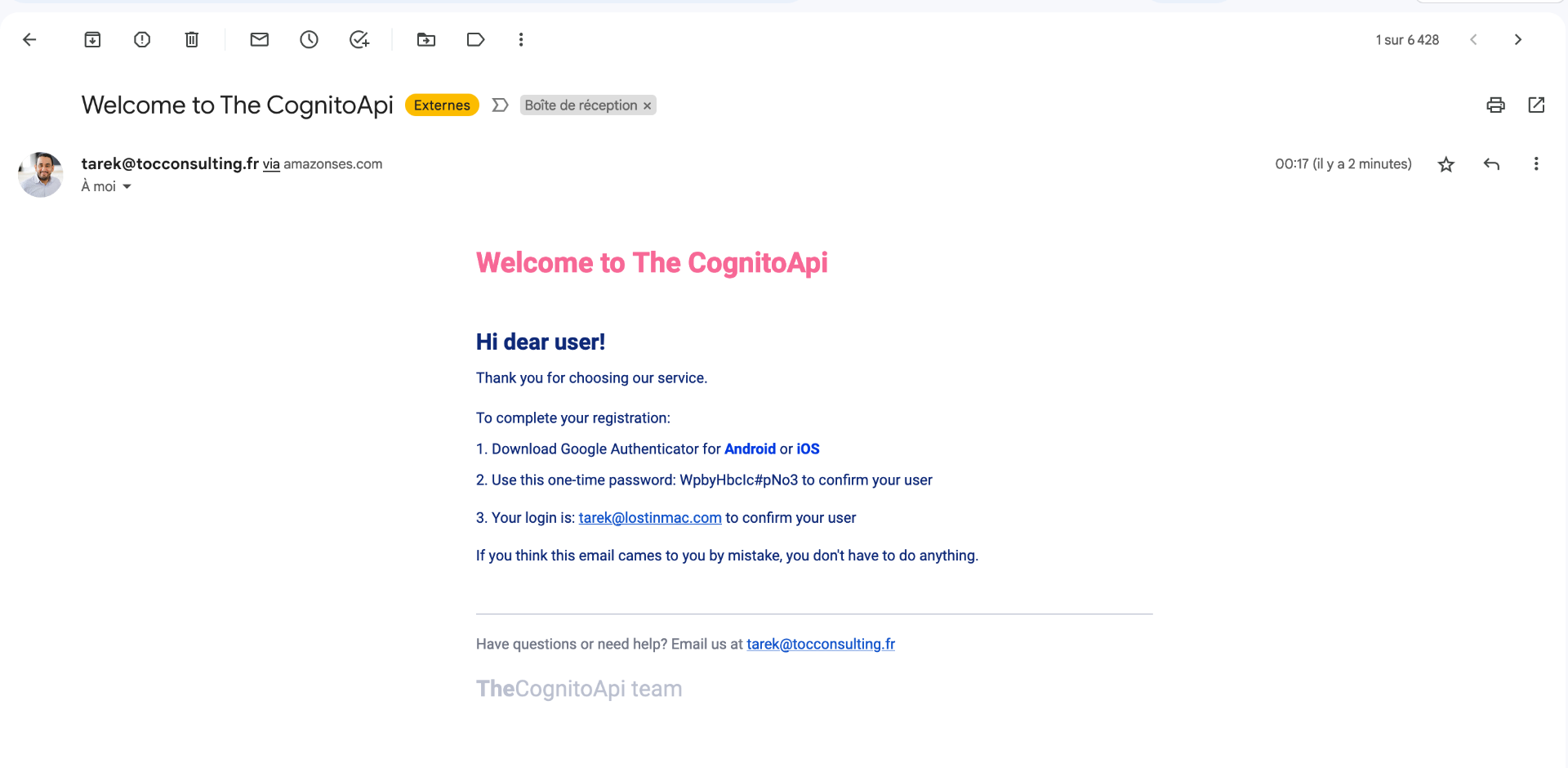
Key Components:
- Welcome message and service introduction
- Instructions to complete the registration process
- Temporary password for initial login
- MFA setup instructions (Google Authenticator)
- Support contact information
Note: These emails are sent through Amazon SES via a Cognito custom-message Lambda trigger (and, for the MFA-reset code, the recovery Lambda). Subjects, sender, team name and the MFA-reset body are all configured in your terraform.tfvars; the welcome email uses the HTML template under email_templates/.